

Add a New Model
Models and arrays are complementary components in Pseudata: a model defines the structure of your data (like a Person with fields), while an array generates deterministic instances of that model. This guide shows you how to add both using a simple Person example.
Code Generation Flow
Section titled “Code Generation Flow”Understanding how code is generated helps you work effectively with Pseudata:
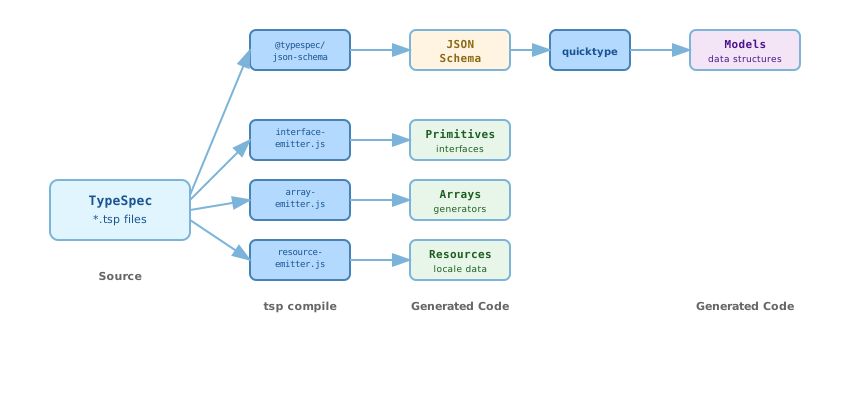
When you define a model in TypeSpec, two paths generate code:
- array-emitter.js: Creates
PersonArrayclasses with generation logic - quicktype: Converts JSON Schema to
Personmodel classes in each language
Step 1: Define TypeSpec Model
Section titled “Step 1: Define TypeSpec Model”Add your model to typespec/src/pseudata.tsp. Each model decorated with @array automatically gets a corresponding array class.
/** * Person object with basic identity information. */@array(TypeSequence.Custom) // Or TypeSequence.Custom + 1, etc.model Person {  /**   * Deterministic PseudoID for this person.   */  @generator("id")  id: string;
  /**   * Family name (surname).   */  @generator("familyName")  family_name: string;
  /**   * Given name (first name).   */  @generator("genderedGivenName")  given_name: string;
  /**   * Full display name.   * Composed from given name and family name.   */  @template("{genderedGivenName} {familyName}")  full_name: string;}
Key Points
Section titled “Key Points”@array(typeSeq): Marks this model for array generation. Use a uniqueTypeSequencevalue.@generator("methodName"): Calls a single primitive method to generate the field value.@template("..."): Composes multiple primitives using{methodName}placeholder syntax.- All referenced primitives must exist in
primitives.tspand be implemented across all languages.
Step 2: Run Code Generation
Section titled “Step 2: Run Code Generation”From the TypeSpec directory, run the code generation:
cd typespecnpm run generateWhat Gets Generated
Section titled “What Gets Generated”The generation process creates files in all four SDKs:
models.{go,java,py,ts}: Person struct/class definitions (via quicktype)arrays.{go,java,py,ts}: PersonArray class withat(index)method- Generator functions:
generatePerson(worldSeed, typeSeq, index)in each language
Example generated code in Go:
// Go - arrays.gofunc generatePerson(worldSeed uint64, typeSeq uint64, index int) Person { p := NewPrimitivesImpl(worldSeed, typeSeq, index) return Person{ Id: p.Id(), FamilyName: p.FamilyName(), GivenName: p.GenderedGivenName(), FullName: p.GenderedGivenName() + " " + p.FamilyName(), // template expanded }}Notice how @template("{genderedGivenName} {familyName}") was expanded into actual method calls with string concatenation.
Step 3: Verify Generated Code
Section titled “Step 3: Verify Generated Code”Check that files were created in all SDK directories:
- Go:
sdks/go/models.goandsdks/go/arrays.go - Java:
sdks/java/src/main/java/dev/pseudata/Models.javaandPersonArray.java - Python:
sdks/python/pseudata/models.pyandarrays.py - TypeScript:
sdks/typescript/src/models.tsandarrays.ts
Step 4: Use the New Model
Section titled “Step 4: Use the New Model”The generated array classes provide access to deterministic instances:
// Gopeople := pseudata.NewPersonArray(42)person := people.At(0)fmt.Println(person.FullName) // "John Smith"// TypeScriptconst people = new PersonArray(42);const person = people.at(0);console.log(person.full_name); // "John Smith"Every call with the same world seed and index returns identical data across all languages.
Fixture-Based Testing
Section titled “Fixture-Based Testing”After adding a new model, add fixture-based tests to ensure cross-language consistency. See the Testing Guide for a comprehensive explanation of how fixtures work.
Model Fixture Structure
Section titled “Model Fixture Structure”Model fixtures test complete object generation with all fields:
{ "testCases": [ { "worldSeed": 42, "index": 0, "expected": { "id": "01936cf0-a0ca-7950-a16f-115e6af03ab3", "family_name": "Smith", "given_name": "John", "full_name": "John Smith" } }, { "worldSeed": 100, "index": 5, "expected": { "id": "01936cf0-a14e-7328-975b-c89a5c6e8f21", "family_name": "Johnson", "given_name": "Emma", "full_name": "Emma Johnson" } } ]}Adding Model Tests
Section titled “Adding Model Tests”-
Create fixture file:
fixtures/array_person_test_vectors.json -
Add Go test in
array_test.go:
func TestPersonArrayFixtures(t *testing.T) {    fixture := loadFixture("fixtures/array_person_test_vectors.json")
    for _, tc := range fixture.TestCases {        people := NewPersonArray(tc.WorldSeed)        person := people.At(tc.Index)
assert.Equal(t, tc.Expected.Id, person.Id) assert.Equal(t, tc.Expected.FamilyName, person.FamilyName) assert.Equal(t, tc.Expected.GivenName, person.GivenName) assert.Equal(t, tc.Expected.FullName, person.FullName) }}-
Run
go test -updateto generate fixtures -
Implement equivalent tests in other languages
This ensures any change to primitives or generation logic is caught immediately if it breaks consistency.
Troubleshooting
Section titled “Troubleshooting”Primitive method not found
Check that the method exists in typespec/src/primitives.tsp and is implemented in all supported languages.
Template syntax error
Ensure {methodName} placeholders match existing primitive method names exactly (case-sensitive).
Compilation fails
Run tsp compile src from the TypeSpec directory to see detailed error messages.
Quicktype fails
Verify that all model field types are valid JSON Schema types. Complex TypeSpec types may need conversion.
© 2025 Pseudata Project. Open Source under Apache License 2.0. · RSS Feed