

Add a New Resource
Resources are locale-specific data files (names, cities, words) that Pseudata uses to generate realistic, culturally appropriate test data. This guide shows you how to add new resources and make them available across all SDKs.
Code Generation Flow
Section titled “Code Generation Flow”Resources follow a different path than models:
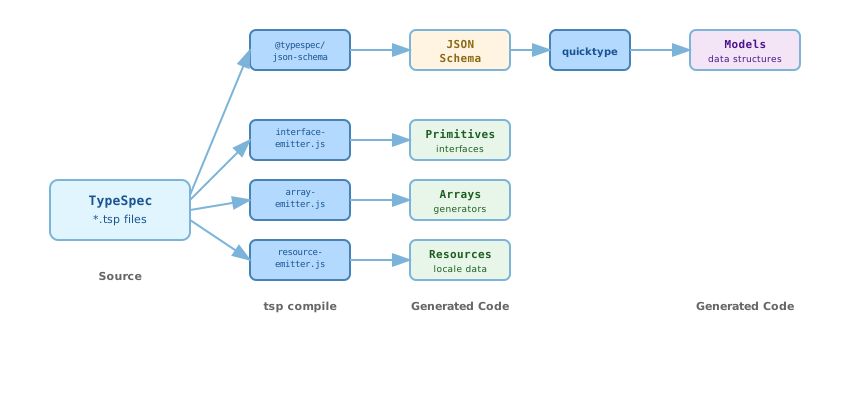
resource-emitter.js reads your text files from typespec/resources/ and embeds them directly into the generated SDK code, making them available at runtime without file I/O.
Resource Hierarchy
Section titled “Resource Hierarchy”Resources are organized into atomic modules by scope:
- Global:
typespec/resources/general/email_domains.txt - Language-level:
typespec/resources/lang/en/adjectives.txt - Country-level:
typespec/resources/country/us/timezones.txt - Locale-specific:
typespec/resources/locale/en_us/cities.txt
Note: All directory and file names use lowercase (e.g., en_us, email_domains.txt) for cross-platform consistency.
Step 1: Determine Resource Type
Section titled “Step 1: Determine Resource Type”Choose the appropriate level for your resource:
Locale-specific (en_us, fr_fr, ja_jp)
typespec/resources/locale/en_us/- Given names and family names
- City names
- Street names
- Data that varies by both language and country
Language-level (en, fr, ja)
typespec/resources/lang/en/- Common nouns, adjectives, verbs
- Month and weekday names
- Generic words for that language
- Data that’s language-dependent but not country-specific
Country-level (us, gb, jp)
typespec/resources/country/us/- Phone number formats
- Postal code patterns
- Address formats
- Timezones
- Data that’s country-dependent but not language-specific
Global
typespec/resources/general/- Email domains
- File extensions
- Data that’s universal across all locales
Step 2: Add Resource File
Section titled “Step 2: Add Resource File”Create a text file with one entry per line. Let’s add job titles as an example.
For locale-specific resources (US English):
# Create en_us directory if it doesn't existmkdir -p typespec/resources/locale/en_us
# Add job titles specific to US marketcat > typespec/resources/locale/en_us/job_titles.txt << EOFSoftware EngineerProduct ManagerData ScientistUX DesignerDevOps EngineerSales ExecutiveMarketing DirectorEOF
For language-level resources (English in general):
# Create en directory if it doesn't existmkdir -p typespec/resources/lang/en
# Add generic English job titlescat > typespec/resources/lang/en/job_titles.txt << EOFManagerEngineerDesignerAnalystConsultantDirectorCoordinatorEOF
Step 3: Update Resources Model
Section titled “Step 3: Update Resources Model”Add a field to the Resources model in typespec/src/pseudata.tsp:
model Resources {  // ... existing fields like givenMaleNames, cities, etc. ...
  /**   * List of job titles.   * Used for generating professional titles.   */  jobTitles: string[];}
Step 4: Update Resource Emitter
Section titled “Step 4: Update Resource Emitter”Modify typespec/lib/resource-emitter.js to load your new resource.
Find the loadResourcesForLocale() function and add your resource to the returned object:
return {  // ... existing resources ...  givenMaleNames: loadResourceFile(locale, country, language, "given_male_names.txt") || [],  givenFemaleNames: loadResourceFile(locale, country, language, "given_female_names.txt") || [],
  // Add your new resource  jobTitles: loadResourceFile(locale, country, language, "job_titles.txt") || [],};
Step 5: Create Primitive (Optional)
Section titled “Step 5: Create Primitive (Optional)”If you want a dedicated primitive method for easy access:
Add the signature to typespec/src/primitives.tsp:
interface Primitives {  // ... existing primitives ...
  /**   * Generates a job title.   * Selected from locale-specific job titles pool.   */  jobTitle(): string;}
Then implement in all supported languages:
// Go - primitives_impl.gofunc (p *PrimitivesImpl) JobTitle() string { data := p.resources() titles := data.JobTitles return p.Element(titles)}// Java - PrimitivesImpl.java@Overridepublic String jobTitle() { Resources data = resources(); String[] titles = data.jobTitles; return element(titles);}# Python - primitives_impl.pydef job_title(self) -> str: """Generates a job title.""" data = self._resources() titles = data["jobTitles"] return self.element(titles)// TypeScript - primitives-impl.tsjobTitle(): string { const data = this.resources(); const titles = data.jobTitles; return this.element(titles);}Step 6: Run Code Generation
Section titled “Step 6: Run Code Generation”Generate the updated SDK code:
cd pseudata-poctask generateWhat Gets Generated
Section titled “What Gets Generated”Atomic Modules (for tree-shaking):
resources/general/data.{go,java,py,ts}: Global resources moduleresources/lang/en/data.{go,java,py,ts}: English language resources moduleresources/country/us/data.{go,java,py,ts}: US country resources moduleresources/locale/en_us/data.{go,java,py,ts}: US English locale resources module
Regional Bundles:
resources/bundles/us.{go,java,py,ts}: Composes atomic modules for USresources/bundles/world.{go,java,py,ts}: Composes all atomic modules- 25 other geographic and business bundles
Monolithic Export (for convenience):
resources.{go,java,py,ts}: All locales in one file (backward compatibility)
Resource data is embedded directly in code for all locales, with no runtime file I/O needed.
Access resources directly from code:
// Go - Direct accessdata := p.resources()titles := data.JobTitlestitle := titles[index % len(titles)]Or use via primitive in models:
model Employee {  @generator("id")  id: string;
  @generator("jobTitle")  job: string;}
Or in templates:
model Employee {  @generator("id")  id: string;
  @template("{jobTitle} at {companyName}")  title: string;}
Fixture-Based Testing
Section titled “Fixture-Based Testing”If you created a new primitive that uses your resource, add fixture tests to ensure cross-language consistency. See the Testing Guide for details on how fixture-based testing works.
Why Test Resources
Section titled “Why Test Resources”Resources have language-specific access patterns that must be tested:
- Loading: Resource file must exist and be embedded correctly
- Access: Dictionary vs. property syntax varies by language
- Determinism: Same seed must select same item from resource array
Resource Fixture Structure
Section titled “Resource Fixture Structure”Test the primitive that uses your resource:
{ "testCases": [ { "name": "jobTitle_en_US", "worldSeed": 42, "typeSeq": 0, "index": 0, "locale": "en_US", "expected": "Software Engineer" }, { "name": "jobTitle_different_seed", "worldSeed": 100, "typeSeq": 0, "index": 0, "locale": "en_US", "expected": "Product Manager" } ]}Adding Resource Tests
Section titled “Adding Resource Tests”- Add test in Go (
primitives_test.go):
func TestJobTitleFixtures(t *testing.T) {    fixture := loadFixture("fixtures/primitives_test_vectors.json")
for _, tc := range fixture.TestCases { p := NewPrimitivesImpl(tc.WorldSeed, tc.TypeSeq, tc.Index) // Set locale if needed got := p.JobTitle() assert.Equal(t, tc.Expected, got, tc.Name) }}-
Run
go test -updateto generate/update fixtures -
Implement equivalent tests in other languages
This catches resource loading bugs, access pattern errors, and ensures deterministic selection across all SDKs.
Best Practices
Section titled “Best Practices”File Format
- One entry per line
- UTF-8 encoding
- No empty lines (they’ll be included as empty strings)
- Trim whitespace from entries
Naming Conventions
- Use snake_case for file names:
job_titles.txt,street_suffixes.txt - Match the TypeSpec field name:
jobTitles→job_titles.txt
Resource Size
- Keep files under 10MB for faster compilation
- For large datasets, consider splitting into multiple resources
- Resources are embedded in code, so size affects binary size
Locale Coverage
- Start with
en_USas the reference implementation - Add other locales incrementally based on need
- Each locale must have its own complete resource files
© 2025 Pseudata Project. Open Source under Apache License 2.0. · RSS Feed